Webhooks
In Userlist, you can use Webhooks right inside your workflows. This node allows you to send an HTTP request to an external server. Use it to connect Userlist to third-party services, trigger custom backend logic, or relay data to your own systems at a specific moment in a workflow.
To receive a firehose of all events of a specific type from Userlist, you can use the webhooks integration instead of this node. This node is more useful for sending specific data at specific moments in time, like when a user reaches a certain point in the workflow, or when they meet a certain condition.
Configuring the request
You can configure three parts of the request: the endpoint, headers, and body.
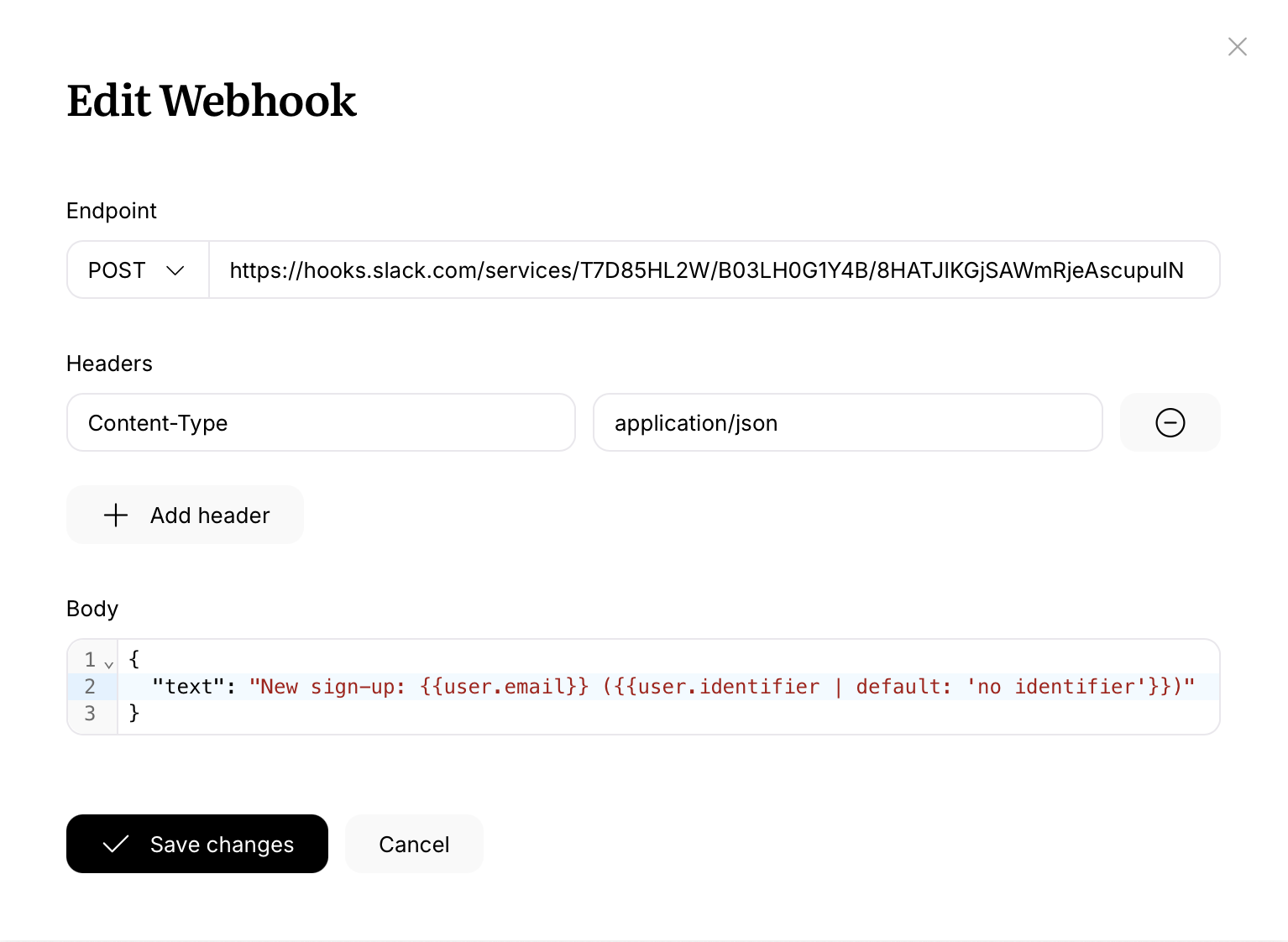
Endpoint
Pick an HTTP method and enter the URL you’d like to call. We support GET, POST, PUT, PATCH, and DELETE. The URL must start with http:// or https:// and use the standard port (80 or 443).
Headers
Add any headers your endpoint requires as name/value pairs. We pre-fill Content-Type: application/json for you, but you can edit or remove it. This is also where you configure authentication, for example Authorization: Bearer YOUR_TOKEN or X-API-Key: YOUR_KEY.
A handful of headers are reserved and can’t be set:
HostContent-LengthTransfer-EncodingConnectionX-Userlist-Signature
Body
Enter the payload you’d like to send. The body field has JSON syntax highlighting, but you can send any format your endpoint expects. Just make sure the Content-Type header matches. GET requests can’t have a body.
Using dynamic values
The URL, header values, and body all support Liquid tags, so you can include data from the user, company, event, or relationship that triggered the workflow. For example, the following body will send the current user’s email and signup date:
1
2
3
4
{
  "email": {{ user.email | json }},
  "signed_up_at": {{ user.signed_up_at | json }}
}
The json filter takes care of wrapping strings in quotes and escaping any special characters, so your payload stays valid JSON even when a property contains a quote or a newline.
You can also use Liquid in the URL itself, for example:
1
https://api.example.com/users/{{ user.identifier }}/sync
Signing requests
If your endpoint verifies request signatures, you can compute a signature in a header value using Liquid. The rendered request body is available as request.body, and there are several hashing filters at your disposal, including md5, sha1, sha256, hmac_sha1, and hmac_sha256.
The exact format depends on what your service expects. Every integration has its own conventions around which header to use, how to format the value, which parts of the request to include in the signed payload, and which hashing algorithm to use. Check your endpoint’s documentation, then adapt the Liquid accordingly.
As one example, here’s a X-Signature header value that produces a timestamped HMAC-SHA256 signature similar to the format used by Stripe and a few other services:
1
t={{ now | date: "%s" }},v1={{ now | date: "%s" | append: "." | append: request.body | hmac_sha256: "your-webhook-secret" }}
Your own setup will likely differ. Treat this as a starting point, not a template to copy verbatim.
Delivery and retries
Requests time out after 5 seconds. If the response status is in the 2xx or 3xx range, we consider the request successful. Anything else (4xx, 5xx, connection errors, timeouts) is retried up to 10 times with backoff. The workflow continues to the next node as soon as the request is dispatched. It doesn’t wait for a response, and the response body isn’t stored or available in later nodes.
If your endpoint is slow to respond, requests may time out and retry. Make sure it acknowledges the request quickly (ideally under a second) and does any heavy processing asynchronously.