
Compared to regular email A/B testing, testing workflows lets you see the bigger picture of your email automation and how it can directly contribute to driving retention and revenue.
When should you A/B test behavior-based workflows? How do you structure these tests?
We talked to email automation experts to see how they structure their workflow A/B tests, what they learned from past tests, and more.
Meet our email automation experts:
- Aiza Coronado, co-founder of CaaSocio
- Michael Ko, co-founder of Suped
- Étienne Garbugli, lifecycle email consultant (member of our consultants directory) and author of “The SaaS Email Marketing Playbook”
- Andrew Dyuzhov, marketing director of Selzy
- Sergey Ermakovich, chief marketing officer of HasData
- Ben Robertson, founder of ColorBliss
Don’t wait for the muse. Apply this step-by-step method to write high-performing email campaigns in hours, not weeks.
Regular email A/B testing versus testing behavior-based automation workflows
How exactly does regular email A/B testing differ from testing workflows?
| Regular email A/B testing | A/B testing behavior-based automation workflows | |
|---|---|---|
| What’s being tested | 2 variations of an email. Variations are based on things like email design, tone of voice, send time, etc. | At least 2 branches at the trigger point of the workflow |
| What do you want to know | Which email variation gets higher engagement and/or conversions | Which branch gets higher engagement and/or conversions |
| Audience | An email list or broad segment | Users who are part of a specific workflow |
| Do you need a holdout group? | Usually not needed | Usually, yes |
| Entry point | Usually no requirements | User enters the workflow based on a trigger event (i.e. user action, product milestone) |
| How success is measured | Higher engagement and (rarely) conversion into specific behavior | Higher engagement and (rarely) conversion into specific behavior |
Examples of behavior-based workflows to A/B test
While it’s definitely possible to test any workflow in the user journey, A/B tests are usually done at certain points in the journey that result in the user taking the desired action, and/or drive business growth.
Here are some workflows you can A/B test.
Workflows in product experiments
Aiza Conorado of CaaSocio shares that she uses workflows as scaffolding when they do product experiments:
“I set up separate email and in-app workflows whenever there’s a product experiment that we want to do. For example, we want to test 2 signup flows: 1 with credit card and 1 without credit card opt-in.”
Workflows that drive user journey progression
Suped co-founder Michael Ko shares that they setup triggers in the user journey and test which email versions nudge users to take the next action:
Because Suped is a DMARC platform, they A/B test workflows such as:
- Onboarding sequences after signup
- Nudges when users start but do not finish key setup steps (i.e. adding a domain or configuring DMARC/SPF/MTA-STS)
- Alert emails tied to product activity (i.e. deliverability issues, unauthorized sending sources, DMARC compliance changes, or threats blocked)
- Invite and team activation flows
- Weekly domain summary emails with dynamic content and product specific recommendations
Sergey Ermakovich of HasData shared that they perform an A/B test of their workflow at the first successful API call milestone:
“We separate those users who signed up but did not succeed in making a request during 48 hours, depending on the error they get.
For example, we may trigger a debugging guide depending on whether it is 403 or 429.”
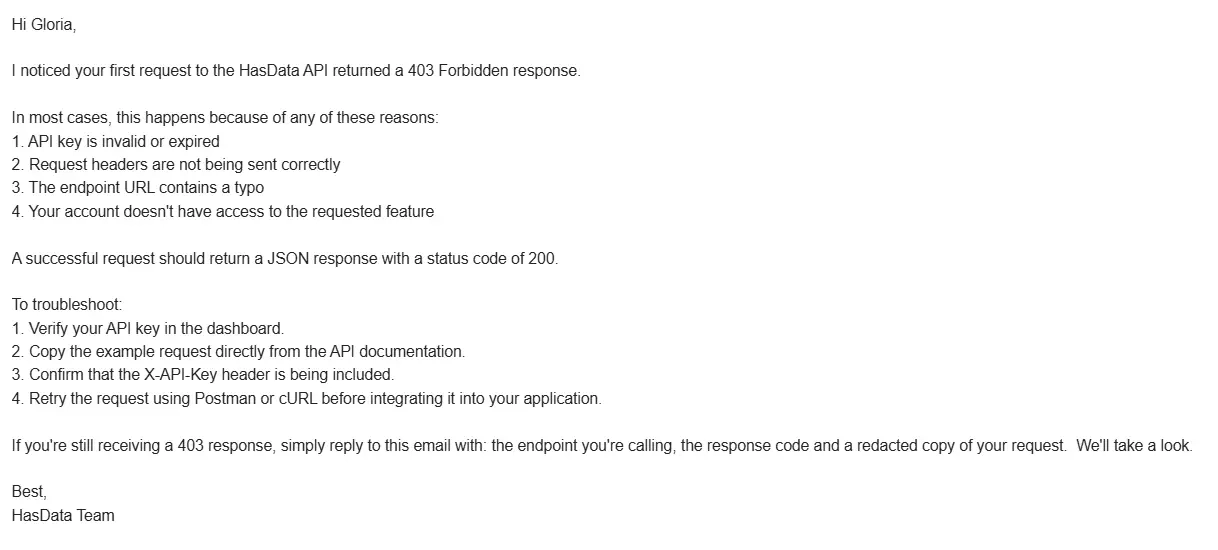
They randomly split users into three branches (version A, version B, and a holdout group). The Version A branch receives the plain-text and technical track email:
“It has minimalist formatting, written from the perspective of the company’s chief developer and containing just the necessary code snippet or the way-out problem-solving.”
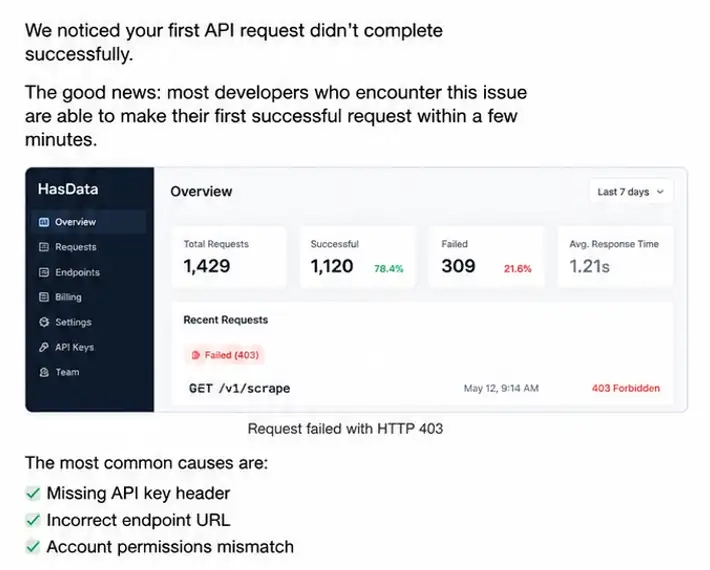
Meanwhile, the Version B branch receives a visual and value-first email:
“This version has high structuring of the text, with lots of dashboard screenshots, data visualization examples, and detailed walkthroughs of how to use our product.
Re-engagement workflows
The HasData team also tests their re-engagement flow that is triggered when there’s a sudden drop in activity:
“After a month of regular activity, we detect a sudden drop in request activity to our scraping endpoints. The result is an automated emergency re-engagement email sent to the particular user.”
Abandoned checkout workflows (e.g. purchasing credits)
Ben Robertson, founder of ColorBliss, shares that they’ve done A/B tests to see which flow is more effective in converting leads who fail to checkout at their pricing page. These leads are randomly split into two branches.
Branch A receives an email about credit packs:
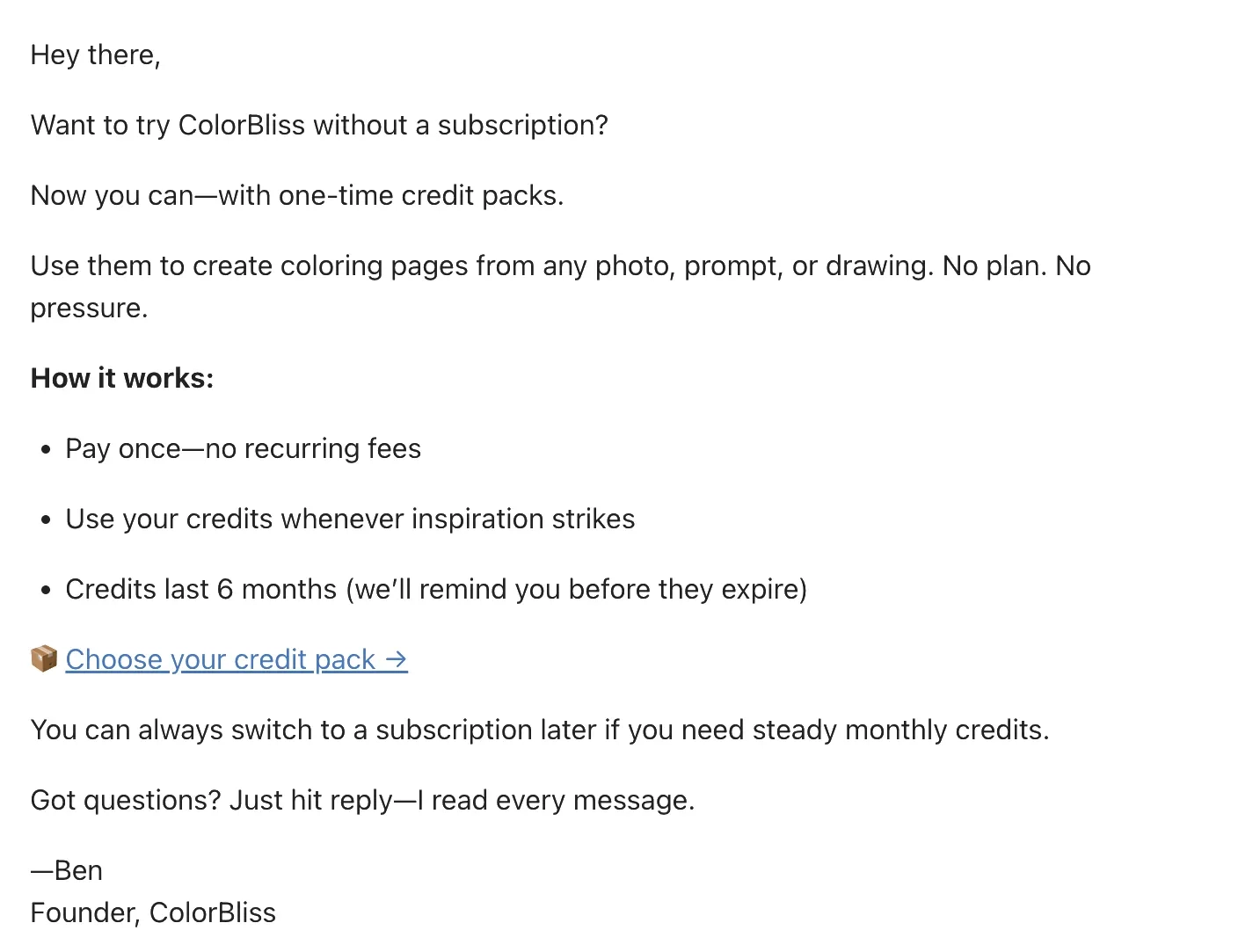
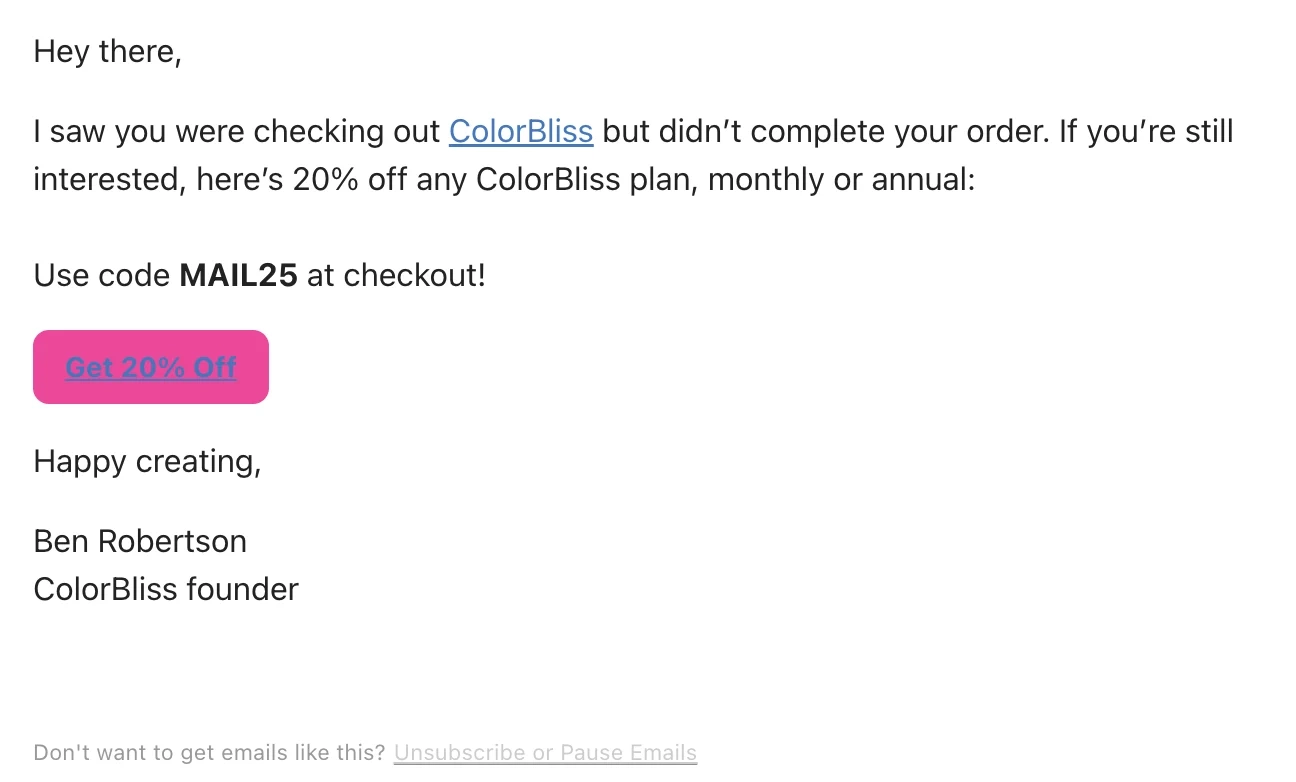
While Branch B is offered a 20% off the annual subscription:
Sergey shares that they test the workflows triggered when a self-serve paying customer reaches 80% of their API credit usage quota:
“We test between the automated upgrade path and ‘credit top up’ for a better lifetime value and churn metrics.”
What is a holdout branch?
A holdout branch is the group excluded from an email or automation. Comparing the metrics between your control and holdout groups helps you determine if an email or additional automation was effective or not.
Holdout branches are essential in workflow tests because they help compare the impact of other branches with baseline user behavior.
How to structure A/B tests on behavior-based workflow automations
Step 1. Determine the entry criteria of the workflow
Users will generally enter the workflows when they perform or do not perform a specific action or meet a specific criteria. Below are some examples.
Action performed or not performed:
- User did not finish key setup steps
- User did not buy a subscription
- User did not succeed in their first API call
Criteria met or not met:
- With or without credit card details
- User reached 80% of credit usage
Step 2. Validate the triggers first and the behavioral angles second
Étienne shares that he first validates the trigger before testing the behavioral angles:
“I start by validating the trigger with a holdout to confirm the email/message adds anything at that trigger (e.g. message versus no message).
If it does, I run a series of A/B tests with diverse behavioral angles to find what framing/offer gets users to act.”
After determining the winning behavioral angle, he then tests the email elements for micro-optimization:
“Once I have a winner, I run more A/B tests to optimize the specifics: subject line, personalization, CTA, body copy, and design.”
Step 3. Decide on the number of branches
Depending on the entry criteria and what you’re testing, A/B tests on workflows would usually involve two branches at the minimum, which already includes the holdout branch.
Others split their audiences up to three to compare two flows against the control or holdout group.
Selzy’s marketing director Andrew Dyuzhov shares that they split the audience into three branches (control, experimental, and holdout group) when testing within product scenarios, ending up with a 45-45-10% split:
“When it comes to tests within scenarios, we create a new branch to be tested, run it in parallel with the ‘original’ and set aside 10–15% of the audience as a control group that won’t receive any emails at all. We end up with a distribution like 45/45/10.
From there, it depends on what exactly we’re checking. It could be conversion to payment, ARPU, conversion to some specific in-service action, or even basic open rate / CTR (though in that case we don’t create a control group — we just split the segment 50/50).
In the end we collect data across all three segments (or two, as in the last example) and compare against the control group.”
At HasData, they also split their branches into three to test the effectiveness of their email formatting and set tracks:
- Branch A (the plain-text/technical track). Minimalist formatting, written from the perspective of the company’s chief developer and containing just the necessary code snippet or the way-out problem-solving.
- Branch B (the visual/value-first track). High structuring of the text, with lots of dashboard screenshots, data visualization examples, and detailed walkthroughs of how to use our product.
- Holdout Branch (10% random group). 10% random users who qualify for the trigger and receive 0 emails (no notifications or reminders at all) from our company. This is necessary to calculate the real conversion/retention baseline.
Step 4. Determine the definition of the holdout group
A holdout group doesn’t automatically mean that the users entering the branch will not get any emails (they could be still receiving emails from other workflows). So be clear about your definition of a holdout group in your test.
Michael shares how they define it based on what automation they are testing:
“For-non critical automations, the holdout branch means no extra automation beyond the expected product experience.
For transactional or security critical emails, the holdout branch means the current/control version, not no email.”
Step 5. Set the definition of a winning branch
Email engagement metrics might be nice to look at, but they don’t determine the winning branch on their own. Michael shares why:
“Email opens and clicks are useful debug signals, but the winning branch is the one that produces more meaningful product progress.”
Depending on what metrics you’re monitoring, the winning branch results in:
- Users performing the desired action. Depending on your platform, you can define the desired action as activating an account, inviting team members, etc.
- Improved business metrics. Increase in conversions, revenue, ARPU, customer lifetime value, etc.
- Improved email metrics. Increase in opens or clicks.
Don’t wait for the muse. Apply this step-by-step method to write high-performing email campaigns in hours, not weeks.
Interesting learnings from A/B testing experiments
Don’t ignore the low-intent segment
Aiza decided to send a free trial email to users who initially did not share credit information. This resulted in more conversions:
“We’ve seen that only 2% of the users share credit card info so we decided to give a free trial to those who didn’t share their credit cards. We sent a trial link via email.
We were able to convert an additional 2% from that segment, which is 10x the users compared to those who initially shared their credit card details.”
Behavior-triggered emails perform better because of context
The Suped team’s tests revealed that behavior-based emails performed better versus generic lifecycle emails because it had context:
“Behavior triggered emails outperform generic lifecycle emails because they reach users when they already have specific context.
For example, an email about a DMARC issue after the user has added a domain is much stronger than a generic onboarding email explaining DMARC.”
Emails with data or specific next steps are more useful for technical audiences
Michael also shared that their technical audience takes action when presented with numbers or specific next steps:
“Emails that include actual domain status, compliance results, detected sending sources, blocked threats, or specific next steps are more useful than broad product tips.”
Trigger and angle selection produce bigger uplifts than micro-optimizations
Étienne says that it’s better to focus on trigger and angle selection. It produced bigger uplifts than micro-optimization of email elements:
“The biggest lifts came from trigger and angle selection, not micro-optimization. Getting the pitch right for the audience consistently produced large lifts.
Adding personalization tokens to make an email seem tailored was generally less effective than finding the right framing for the segment. Optimizing subject lines on a trigger that doesn’t work is wasted effort.”
Dig deeper into the audience context & culture
After running a test studying the impact of tone of voice in their emails across multiple languages, the Selzy team learned that a simple translation isn’t enough, and you should dig deeper into the audience context:
“When we launched one of the new versions of our welcome series and then ran a test studying the impact of tone of voice (comparing a more ‘dry/technical/directive’ style versus a ‘marketing/friendly/casual’ one), we got drastically opposite results for some language segments.
With identical email content and core CTAs, the delivery/style played a noticeable role in the results, which makes sense because in some cultures one communication style feels more natural while for others, a different style does.
So it never hurts to dig deeper into the context of the audience you’re working with, since a simple translation isn’t always enough.”
Plain-text emails work better with technical audiences
Sergey and the HasData team learned that plain-text emails are more effective for their technical audience:
“In our activation sequence for developers that faced 403 Forbidden error in API requests, plain text (a simple snippet explaining the issue) helped to activate 42% more of these APIs over graphics-heavy design in Branch B.”
Silence is expensive
For their test triggered on the 80% Quota, he learned that you might be leaving money on the table if you don’t explicitly remind your users that they should upgrade or buy more credits at this point:
“In our 80% Quota workflow test, comparing the automated upgrade path against the holdout group resulted in significantly higher revenue lift (28%) from our active branches because otherwise, the users would let their scripts break themselves or move to a competitor once the quota ran out.”
Too much automation may lead to unsubscribes
From their tests on reactivation sequences, the HasData team that too much automation might result in unsubscribes:
“Testing between a 3-step and a 1-step reactivation sequence for inactive users turned out to produce only 3% lift in reactivation while causing 114% growth in the total number of unsubscribed workspaces.”
Michael emphasized the importance of holdout branches because looking solely at email engagement can be misleading, which is why they judge success by downstream behavior:
“Some email versions get more clicks but do not create more setup completion or issue resolution.”
Ben looks beyond email metrics because the revenue might tell a different story.
When he tested the two branches in their checkout abandonment flow showed roughly the same numbers in terms of email metrics:
| Branches | Open rate | Click rate |
|---|---|---|
| Credit pack email | 32.5% | 4.5% |
| 20% off subscription email | 33.9% | 3.6% |
But over the same period, the revenue told a different story:
| Branches | New customers | Avg order value | Attributed first time revenue |
|---|---|---|---|
| Credit pack email | 36 | $31.33 | $1,061.00 |
| 20% off subscription email | 63 | $34.66 | $2,226.60 |
Stories from SaaS email automation experts
CaaSocio
CaaSocio co-founder Aiza Coronado shares that they A/B test email workflows when they do product experiments:
“I set up separate email and in-app workflows whenever there’s a product experiment that we want to do. For example, we want to test 2 signup flows: 1 with credit card and 1 without credit card opt-in.”
When testing product changes, they use distinct user variables to separate the flows. In this specific example, it’s the presence of credit card details:
“Since this is a product change, I use distinct user variables to separate the flows, (i.e. creditcard = yes and creditcard = no). A/B tests due to product changes are easier to do compared to A/B tests due to email flow experiments.”
They then sent a free trial email to the segment who did not share their credit card information, resulting in a higher conversions:
“We’ve seen that only 2% of the users share credit card info, so we decided to give a free trial to those who didn’t share their credit cards. We sent a trial link via email. We were able to convert an additional 2% from that segment, which is 10x the users compared to those who initially shared their credit card details.”
Suped
Michael Ko, co-founder of Suped, shares that they do A/B tests at several points in the lifecycle such as:
- Onboarding sequences after signup
- Nudges when users start but do not finish key setup steps (i.e. adding a domain or configuring DMARC/SPF/MTA-STS)
- Alert emails tied to product activity (i.e. deliverability issues, unauthorized sending sources, DMARC compliance changes, or threats blocked)
- Invite and team activation flows
- Weekly domain summary emails with dynamic content and product specific recommendations
These tests are done to see which versions nudge the user to take the next useful action:
“The common pattern is that user behavior in the product triggers a specific message, and we test whether different versions help users take the next useful action.”
Michael shares how they structure their email tests and how they evaluate it:
- We keep the same entry criteria, then split users into workflow branches.
- For non critical automations, the holdout branch means no extra automation beyond the expected product experience.
- For transactional or security critical emails, the holdout branch means the current/control version, not no email.
- We do not withhold password resets, invites, or critical alerts.
- We measure downstream product behavior, not just email engagement.
To determine the winning branch, the Suped team looks at things like:
- Domain added
- DNS record configured
- First report viewed
- Issue resolved
- Alert investigated
- User returned to dashboard
- Account activated
“Email opens and clicks are useful debug signals, but the winning branch is the one that produces more meaningful product progress.”
From all the A/B tests they did, the Suped team learned that:
- Targeting and timing matter more than minor copy changes.
- Behavior triggered emails outperform generic lifecycle emails because they reach users when they already have specific context. For example, an email about a DMARC issue after the user has added a domain is much stronger than a generic onboarding email explaining DMARC.
- Context rich emails work better for Suped than generic messaging.
- Emails that include actual domain status, compliance results, detected sending sources, blocked threats, or specific next steps are more useful than broad product tips.
- Holdouts are important because email engagement alone can be misleading.
- Some versions get more clicks but do not create more setup completion or issue resolution.
- We judge success by downstream behavior.
SaaS Playbook
SaaS Playbook author and lifecycle email consultant Étienne Garbugli says that he tests for triggers, behavioral angles, and email-level elements:
“Timing and targeting (is this the right trigger?), behavioral angles (what framing moves users at this stage?), and email-level elements like subject line, sender name, preview text, personalization, CTA, body copy, and design.”
He does A/B testing with a layered approach, starting with the trigger validation and ending with email-level element optimization:
“I start by validating the trigger with a holdout to confirm the email/message adds anything at that trigger (e.g. message vs no message). If it does, I run a series of A/B tests with diverse behavioral angles to find what framing/offer gets users to act.
Once I have a winner, I run more A/B tests to optimize the specifics: subject line, personalization, CTA, body copy, and design.”
Étienne says that trigger and angle selection produced bigger uplifts than micro-optimization of email elements:
“The biggest lifts came from trigger and angle selection, not micro-optimization. Getting the pitch right for the audience consistently produced large lifts.
Adding personalization tokens to make an email seem tailored was generally less effective than finding the right framing for the segment. Optimizing subject lines on a trigger that doesn’t work is wasted effort.”
Selzy
Andrew Dyuzhov, marketing director of Selzy, shares that they build a branching grid to test for different user actions all at once:
“We try to run pretty much any hypothesis through tests, right down to testing send days, email body design, or the type of offer in the CTA. Lately, the focus has been more on testing email design, but that’s tied to internal processes and a task of ‘rethinking’ the visual side of our emails.
As for the more “inventive” tests — specifically those centered on user behavior — there we try from the very start to account for different product usage scenarios (actions taken / not taken within the product) when building the logic of future flows. We build a ‘branching grid’ of emails for different user actions all at once, and then, through testing, we check one branch or another for improvements or, conversely, simplifications.
In other words, right from the start we have a scenario that accounts for many product usage variants. I’d compare the approach to a gardener’s work: out of the many branches on a tree, we only ‘prune’ the ones that aren’t bearing fruit.”
The Selzy team uses three branches to test out scenarios all at once:
“When it comes to tests within scenarios, we create a new branch to be tested, run it in parallel with the ‘original’ and set aside 10–15% of the audience as a control group that won’t receive any emails at all. We end up with a distribution like 45/45/10.
From there, it depends on what exactly we’re checking. It could be conversion to payment, ARPU, conversion to some specific in-service action, or even basic open rate / CTR (though in that case we don’t create a control group — we just split the segment 50/50). In the end we collect data across all three segments (or two, as in the last example) and compare against the control group.
The most important thing here is to gather enough data to be able to calculate the statistical significance of the results (sometimes this isn’t quick — it can take a quarter or even longer).”
One of the many things they learned from doing A/B tests on workflows is you have to account for an audience’s specifics:
“The audience plays a very important role, and you need to account for its specifics. Our product, for example, is used by customers from all over the world.
So when we launched one of the new versions of our welcome series and then ran a test studying the impact of tone of voice (comparing a more ‘dry/technical/directive’ style versus a ‘marketing/friendly/casual’ one), we got drastically opposite results for some language segments. That is, with identical email content and core CTAs, the delivery/style played a noticeable role in the results. Which makes sense because in some cultures one communication style feels more natural while for others, a different style does.
The takeaway: it never hurts to dig deeper into the context of the audience you’re working with, since a simple translation isn’t always enough.”
HasData
HasData’s Chief Marketing Officer Sergey Ermakovich shares that they run A/B test on three particular events, which are:
- Trigger on the “First Successful API Call” Milestone: We separate those users who signed up but did not succeed in making a request during 48 hours, depending on the error they get (e.g., we may trigger a debugging guide depending on whether it is 403 or 429).
- Trigger on 80% Quota Reached for Our Self-Serve Paying Customers: Reaching the 80% usage quota of one’s API credit triggers our workflow experiment: testing between the automated upgrade path and “credit top up” for a better Lifetime Value and churn metrics.
- The Sudden Stop of Requests for 7 Consecutive Days: After a month of regular activity, we detect a sudden drop in request activity to our scraping endpoints. The result is an automated emergency reengagement email sent to the particular user.
When doing these test, their users are randomly split into three groups:
“To implement these tests, we split our user base on the structural level using our email automation tool Customer.io. Users are randomized the second they hit the trigger event. The key point here is that our testing is done by strict splits according to different tracks.”
These three branches are:
- Branch A (the plain-text/technical track): minimalist formatting, written from the perspective of the company’s chief developer and containing just the necessary code snippet or the way-out problem-solving.
- Branch B (the visual/value-first track): high structuring of the text, with lots of dashboard screenshots, data visualization examples, and detailed walkthroughs of how to use our product.
- Holdout Branch (10% random group): 10% random users who qualify for the trigger and receive 0 emails (no notifications or reminders at all) from our company. This is necessary to calculate the real conversion/retention baseline.
From their A/B tests, Sergey and his team learned three things. First, plain text email wins over graphics in communication with technicals.
“In our activation sequence for developers that faced 403 Forbidden error in API requests, plain text (a simple snippet explaining the issue) helped to activate 42% more of these APIs over graphics-heavy design in Branch B.”
Second, silence is really expensive:
“In our 80% Quota workflow test, comparing the automated upgrade path against the holdout group resulted in significantly higher revenue lift (28%) from our active branches because otherwise, the users would let their scripts break themselves or move to a competitor once the quota ran out.”
And the third takeaway is too much automation will lead to unsubscribes:
“Testing between a 3-step and a 1-step reactivation sequence for inactive users turned out to produce only 3% lift in reactivation while causing 114% growth in the total number of unsubscribed workspaces.”
ColorBliss
Ben Robertson, founder of ColorBliss, shares that he tests his checkout abandonment flow:
“One main way I’ve used A/B testing is to test different offers in my ‘abandoned cart’ flow. Here’s an example of a test I’ve been running for a while. I have an automation that runs after a user views the pricing page in my web app.”
The specific steps of his workflow are:
- View pricing page
- Wait 1 hour
- Check if the user became a customer
- If they did not become a customer, enter a random split
- Branch A receives an email that suggests buying a credit pack instead of a subscription
- Branch B receives an email that offers 20% off a subscription
He does the A/B test to see if the credit pack email would outperform the subscription email:
“Each of those branches has sent roughly 2,000 emails over the same time period. I didn’t use a no-email holdout branch–I was already sending the subscription email, and wanted to see if the credit pack email would outperform it on paid conversion and first time revenue.”
And while the email metrics show that the branches performed roughly the same, the first time revenue tells a different story:
“Looking at the email metrics, the emails perform roughly the same:
- Credit pack email: 32.5% open rate, 4.5% click rate
- 20% off email: 33.9% open rate, 3.6% click rate
But when I look at revenue between the two emails, the story is a bit different. Over the same time period:
- Credit pack: 36 new customers, $31.33 average order value, 1,061.00 attributed first time revenue
- subscription discount: 63 new customers, $34.66 average order value, $2226.60 attributed first time revenue
So my subscription discount email has made 2x the revenue over the same time period, while email metrics perform roughly the same.”
Look beyond email engagement
Engagement metrics like opens and clicks don’t tell the whole story.
Testing inside workflows, while taking behavior in consideration, helps us see how various factors contribute to user engagement.
We encourage you to run more experiments, take bolder bets, and share the results with us.
Don’t miss out on new articles. Subscribe to our newsletter and get your monthly dose of SaaS email marketing insights.